

Fedora 15 has been officially released and becomes the first major distribution to use the GNOME 3 Desktop by default. Fedora is a leading edge, free and open source operating system that continues to deliver innovative features to many users, with a new release about every six months.
New Features
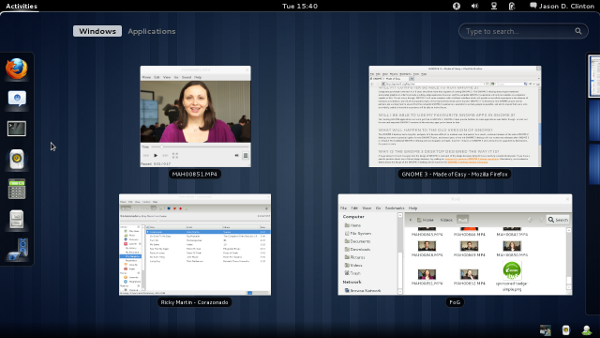
- GNOME 3 Desktop – GNOME 3 is the next generation of GNOME with a brand new user interface. It provides a completely new and modern desktop that has been designed for today’s users and technologies. Fedora 15 is the first major distribution to include GNOME 3 by default. GNOME 3 is being developed with extensive upstream participation from Red Hat developers and Fedora volunteers, and GNOME 3 is tightly integrated in Fedora 15. GNOME Shell, the new user interface of GNOME 3, is polished, robust and extensible, and several GNOME Shell extensions and the GNOME tweak tool are available in the Fedora software repository.
- Btrfs filesystem – Btrfs, the next generation filesystem is being developed with upstream participation of Red Hat developers, Oracle and many others. Btrfs is now available as a menu item in the installer (only for non-live images. live images support just Ext4) and does not require passing a special option to the installer as in the previous releases. Btrfs availability has moved up a notch as a incremental step towards the goal of Btrfs as the default filesystem in the next release of Fedora. The btrfsck program for performing filesystem checks is under active development upstream with participation from Fedora but the one included in this release is still limited and hence users are highly recommended to maintain backups when using this filesystem (backups are a good idea anyway!).
- Better power management – Fedora 15 includes a redesigned and better version of powertop and newer versions of tuned and pm-utils for better power management. The tuned package contains a daemon that tunes system settings dynamically to balance between power consumption and performance. It also performs various kernel tunings according to selected profile. The new version of tuned brings several bug fixes, improvements and profiles updates for better efficiency.
- LibreOffice – OpenOffice.org has been replaced with LibreOffice in this release. LibreOffice is a community-driven and developed free and open source personal productivity suite which is a project of the not-for-profit organization, The Document Foundation. It is a fork of OpenOffice.org with a diverse community of contributors including developers from Red Hat, Novell and many volunteers.
- Firefox 4 – A new major version of this popular browser from the Mozilla non-profit foundation is part of this release. Firefox 4 features JavaScript execution speeds up to six times faster than the previous version, new capabilities such as Firefox Sync, native support for the patent unencumbered WebM multimedia format, HTML5 technologies and a completely revised user interface.
- KDE 4.6 and Xfce 4.8 – Fedora 15 includes new major versions of these alternative desktop environments. Fedora 15 also provides dedicated KDE Plasma Workspaces and Xfce installable live images that include these desktop environments by default.
- systemd system and session manager – systemd is a system and session manager for Linux, compatible with SysV and LSB init scripts. systemd provides aggressive parallelization capabilities, uses socket and D-Bus activation for starting services, offers on-demand starting of daemons, keeps track of processes using Linux cgroups, supports snapshotting and restoring of the system state, maintains mount and automount points and implements a powerful transactional dependency-based service control logic. It can work as a drop-in replacement for sysvinit. A related change is /var/run and /var/lock are mounted from tmpfs and results in a simpler, more faster and robust boot-up scheme and aligns to the default configuration of several other distributions.
- Dynamic firewall – Dynamic firewall makes it possible to change firewall settings without the need to restart the firewall and makes persistent connections possible. This is for example very useful for services, that need to add additional firewall rules including virtualization (libvirtd) and VPN(openvpn). With the static firewall model these rules are lost if the firewall gets modified or restarted.