

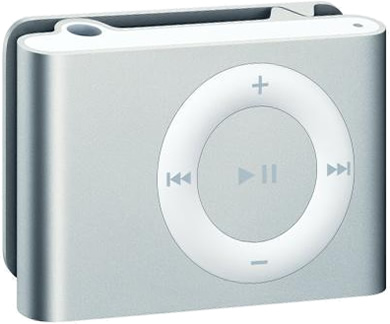
The iPod shuffle is a great little device but unfortunately it is buit to work with iTunes and comes with an almost undecipherable file system and database. Apple’s motives are clear here, buy a Mac and use iTunes. Fortunately for us you can save your money as there are a variety of ways to sync your Shuffle using some common Linux utilities.
Now it’s not all rosy, for some reason the iPod Shuffle support on Linux is shaky compared to other iPod models. This guide will walk you though all these problems and get your iPod Shuffle playing nice with your Linux system. This guide will focus on Ubuntu but these instructions will work with any Linux distribution out there.
Step 1: Initial Setup
If you have a new iPod Shuffle you can start here. If you are having problems skip down to the troubleshooting section.
Install gtkpod
Normally you have to connect your Shuffle to iTunes to setup the initial directory structure. gtkpod will handle this instead which allows your shuffle to locate and play music.
Install gtkpod:
$ sudo apt-get install gtkpod
Setup iTunes Directory Structure
Now connect your Shuffle to your computer and it should automatically mount to /media/IPOD or something similar. Start gtkpod.
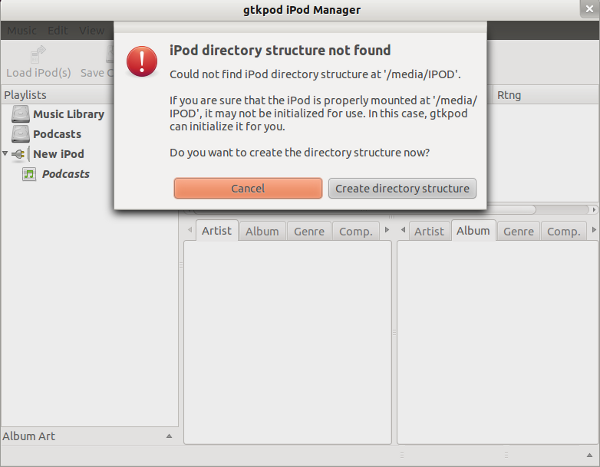
Click on the New iPod icon and it should ask to create the iPod directory structure. Follow the instructions and choose your iPod model (Shuffle 2nd gen/3rd gen, etc.).
Step 2: Adding Music
Now that the Shuffle has the initial directory structure you can add music. You can use a variety of applications to do this.
If you use gtkpod or Rhythmbox they will work with the iTunes directory format and update the music database automatically. If you want to use Banshee or you want to add music using a file manager like Nautilus or Thunar you will have to download the shuffle_db program to update the database for you.
Optional: Download shuffle_db
This is a little Python program allows you to use the player almost like any other USB flash MP3 player. You simply copy MP3 files onto it using any file manager or application such as Banshee or Rhythmbox then simply run the rebuild_db program to build the music database.
Download shuffle_db:
http://shuffle-db.sourceforge.net/
Once you have downloaded the shuffle_db program rebuild_db.py, copy it to the root directory on the iPod Shuffle. Now you can add music to the root directory of the Shuffle and when you are done run the rebuild_db.py script to update the music database.
Execute the script. Your iPod my be mounted at a different location.
$ /media/IPOD/rebuild_db.py
Step 3: Unmount Shuffle and Enjoy
That should be it. Safely unmount your Shuffle and you should be able to listen to music right away.
Troubleshooting
The Shuffle is visible to Rhythmbox or gtkpod but no songs are listed
The permissions on the Shuffle are incorrect or the database is corrupted. This can happen if you have gone a long time since you last added music to your iPod Shuffle and there have been significant changes to your system (updated distribution, or updated gtkpod/Rhythmbox).
You can proceed in one of two ways.
1) Download shuffle_db program and execute it to rebuild your music database.
2) Remove all songs from the device and start at Step 1 above.
Clear the device. Be very careful here.
$ sudo rm -rf /media/IPOD/*
rebuild_db.py won’t execute
The iPod file system or the rebuild_db.py lacks the execute permissions.
Make sure it have execute permissions.
$ chmod +x /media/IPOD/rebuild_db.py
Try executing the program as root (be careful here).
$ sudo /media/IPOD/rebuild_db.py
If that doesn’t work you with have to manually mount the iPod Shuffle and execute the script.
Note: The following locations may differ on your system. Make sure that they are correct before executing any code.
Unmount the Shuffle.
$ sudo umount /media/IPOD
Create the new mount directory.
$ mkdir /media/my_ipod
Mount the iPod with a less restrictive umask. This will allow you to execute the script.
$ sudo mount /dev/sdb /media/my_ipod -o umask=0000
You should now be able to execute the script as root.
$ sudo /media/IPOD/rebuild_db.py
IPod wont play music, green amber flashing lights
The database is corrupted. You need to open Rhythmbox or gtkpod again, or rerun rebuild_db.py depending on how you added music in the first place.